Configuring the Schedule
Scheduling in ZimSaas is driven by Working Hours, Days Off, Special Days, and Office Hours. These rules determine which time slots appear to customers.
Availability of Time Slots
Availability is based on employee Working Hours and assigned services. Days Off block entire days. Special Days override regular hours for specific dates, but they cannot override Days Off.
If employees work Monday–Friday 09:00–17:00, any assigned services are bookable during those times (assuming duration and buffer time fit).
Working Hours Rules
Working hours are configured per employee and repeat weekly. You can:
- Set different hours per employee.
- Create multiple periods per day for different services or locations.
- Leave service/location blank in a period to cover all assigned services at the default location.
Note: Services and locations set on a working period do not update automatically if you change Assigned Services later.
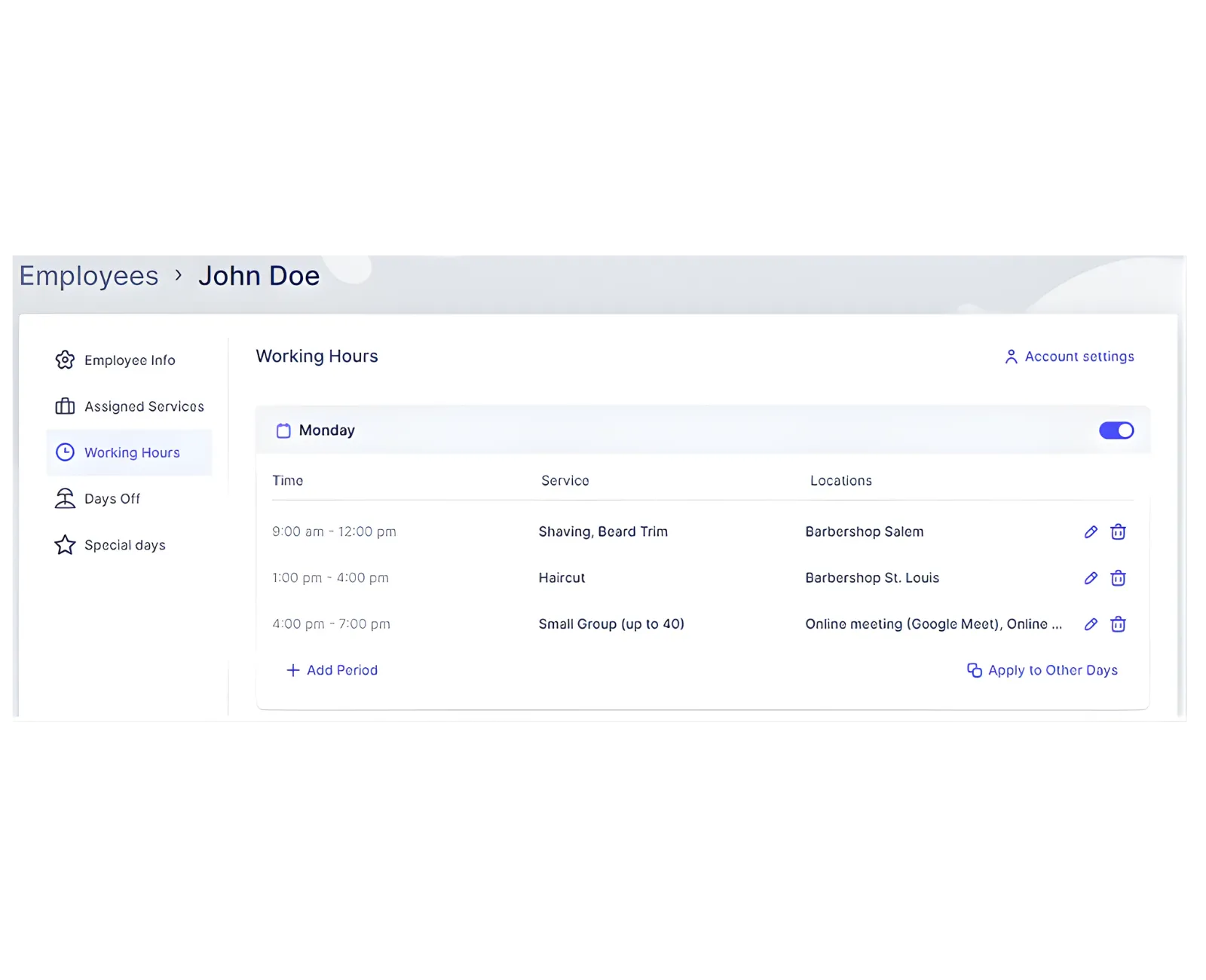
Period Order Matters
You cannot add earlier periods after later ones. If the first period is 09:00–12:00, you must edit or remove it before adding a 06:00–09:00 period.
Days Off Precedence
Days Off take priority over Working Hours and Special Days. Use Employee Days Off for individual staff or Company Days Off for company‑wide closures.
Related Topics
Need help?
Chat with our team on WhatsApp for setup guidance and troubleshooting.
Open WhatsApp support